Showing posts with label IDAT-102. Show all posts
Showing posts with label IDAT-102. Show all posts
Monday, 22 March 2010
Flash Game Marks
Well got my Flash game marks back today and I got 76% wasnt to bad but I think I probably would of got more if I had dropped in some fun aspects like maybe a "penguin" shooting bullets at falling objects but never mind.

Monday, 1 February 2010
Test Again
Well this morning I thought I better go give my game another test before the hand in and it seems to be playing OK, apart from the font in the game on the mac computer as it doesn't have the font I used but I figured out that I can break my fonts into pixels then that way the majority of the text will be the same apart from the actual score, and lives. The next thing now is to cross my fingers and to finish commenting my code so makes it a little easier for people to read it.
Saturday, 30 January 2010
Arr the Game
Well got an email from Chris today and in his email he states he wants the game to run on mac (which it does from a website), but he also states he wants to view it now that's the problem I have done this in Flash CS4 and at Uni its Flash CS3 so easy fix me thinks save it as CS3 file and jobs a good one but oh no, I get to Uni and nothing loads up comes up with error corrupted files, try saving again but same again nothing seems to work so I got on to my trusty online friend (google) and typed in the problems and guess what threes a problem in that I'm using Windows 7 and apparently windows 7 doesn't like flash Cs4, so with this in mind my next step was to download VM ware and install vista and then save the game that way and... I will tell you tomorrow when I test it.
It works....
It works well in a way the file now loads after saving it in vista but then comes some errors which I have tracked down to the levelUpButton but as its late in the day to be modifying code now for the game all I can do is hope that Chris is understanding and sees it does open up now in Cs3 so he can view the source code but the game wont really play the way it was intended i.e. hiding the levelUpButton but nothing I can really do now but to keep fingers crossed. Also I have got to admit how crap it is that Flash CS4 conflicts with Windows 7, also one more thing I been reading some more and I think its down to CS3 exporting the SWF file in flash 9 player when the code was written as a Flash 10 player.
Sunday, 24 January 2010
Completed Game
So the Game is complete and I am proud of it, I actually got to finished the game I started in Java over 2 years ago so I am very pleased that it all works fully, I have taken some screen shots of the game in play and I even added in the external element for the game so depending what time of day it is the background will change again I feel this adds to the game.
So before I go marching on with the pictures I better put in why I chosen to do this game, the 1st reason is simple its an all time classic shoot em up, the 2nd reason is because I did start a game like this in Java for my HND but never got around to completing it fully and the final reason is I wanted a challenge with this game as I can say that I created a game from scratch and coded it with no help (OK some help from my friend Coffee) but that's really the only main reasons why I chose to do this game.
So like I said from the begging I started early to get it out of the way early and a pat on the back for me actually sticking to it and getting it complete.
So now that's all done here are some finish screen shots and then just me to put it up on my Web site: so you can play it here: http://www.retrostudent.co.uk/game.html
well here are the screen shots:


Wednesday, 20 January 2010
Some Errors on the Way
Well as you can probably tell I enjoyed doing this game, but I can say it wasn't without it's errors well OK at one point maybe 34 errors but didn't get a screen shot of that one as I just went straight back into the code to rectify the errors but here are some of the out takes of my Game.


 Error on about losing scope

 Code fix:

Error due to switch statement.
Switch Statement Code
Switch Statment replacement Code
Error on about losing scopeOriginal Code:
Code fix:Thursday, 14 January 2010
Sheild Hit
So after getting the Tank and the Aliens tested for hits the next step was the Shields, I decided that I was going to create a function for this as I will be doing the same code over again for many different items such as the Tank Bombs and the Aliens bombs. The coding for this was straight forward, I did add a little extra to it so that every time the Shields were hit they would fade a little bit this was done with the Alpha setting and deducting 0.10 every hit.
Well here is my code:

Well here is my code:
Wednesday, 13 January 2010
Hit test
Well the Hit test didnt really go down too well at first but after some trial and error I have managed now to get rid of all the aliens with the Tank Bombs hitting them but then encountered some errors this was down to that the timer was still running for something that wasnt on screen so I sorted that out so now the code in the Game is nice and long so now to compress it a bit and then continue with the rest i.e. maybe add some levels and even some lives for the Tank, I want this game to look as good as the original if not a little more updated :-).

p.s. I have used the HitTestObject method as this will detect and posistion with element not just a given posistion.
here is some more code for the HitTest:
This code detects if the aliens hit the Tank and if so goto frame six which is my End Screen.
Friday, 8 January 2010
Bombs moving
So finally got the bombs firing up screen, couldn't understand at first why the bombs were following the tank but then it hit me I needed to update the position of the bomb every frame so therefore I placed my code in the function every frame this was also where my code for the user inputs is. I then decided that due to the amount of code that was going into this function I would be best to place the code into its own function which is called SpaceKeyPressed this takes in a movie clip and then works on the movei clip updating the code every second again this ties in with the user pressing the Spacebay hece the function name SpaceKeyPressed.
I have another snippet of my code to try and make this a bit more understanable:

Monday, 4 January 2010
Tank Bombs
So now I have got the Aliens all moving across the screen at the same time, the next step is for me to actually get the Tank bomb moving up screen and not just follow the tank.
So some more coffee for me.
So some more coffee for me.
Aliens Moving YAY
So in my last post I had one alien moving at once but couldn't figure out how to get them all moving together, but I have now and with a little help from some old Games book "Black art of Game Programming" I found that I needed a tracker (O.k something for each alien to track on screen) this would let each alien basically follow it backwards and forward.
This is a snippit of my code:


This is a snippit of my code:
This is the set up for the Tracker:
This i s the tracker array for which the aliens will follow left and rgith:
Sunday, 3 January 2010
Game Coding
So after getting all the elements going to the correct scenes and actually acting how I want them to act the next step is to continue with the original plan of getting the Aliens moving across the screen and the Tank moving when the user clicks the arrow keys.
Well got that all working now which wasn't to hard modifying my original code to move one single Alien across screen but trying to move rows of them is a bit more trickier so I'm going to go and have a go at trying to get them moving all together.
Well got that all working now which wasn't to hard modifying my original code to move one single Alien across screen but trying to move rows of them is a bit more trickier so I'm going to go and have a go at trying to get them moving all together.
Saturday, 2 January 2010
Game Continued
Hi told you I wouldn't be back until after Crimbo,
So after drawing all the elements and creating all the scenes for them I then decided that before marching ahead with the game and the coding I would test each element in a simple game, i.e. creating a simple click action so that when I clicked the individual elements they would run their animation once.
So what did I do next well I created the little game layout, well OK just an empty screen with the elements on I then added a Mouse click event handler and clicked on the first element and guess what happen... well it did its little explosion and then did another and kept looping each time so what was going on?
I looked at each of the scenes and noticed that I didn't put stop(); in any of the scenes so after finding out that I needed to put stop on each scene so the animation wouldn't loop continually I then realised that I didn't need stop on all the elements as I wanted them some elemets to have the effect of them been broken down into smaller pieces. so with these elements I placed stop(); in the first scene and deleted the rest of the stop() out of all the other scenes and this gave me my desired look that I wanted.
So after drawing all the elements and creating all the scenes for them I then decided that before marching ahead with the game and the coding I would test each element in a simple game, i.e. creating a simple click action so that when I clicked the individual elements they would run their animation once.
So what did I do next well I created the little game layout, well OK just an empty screen with the elements on I then added a Mouse click event handler and clicked on the first element and guess what happen... well it did its little explosion and then did another and kept looping each time so what was going on?
I looked at each of the scenes and noticed that I didn't put stop(); in any of the scenes so after finding out that I needed to put stop on each scene so the animation wouldn't loop continually I then realised that I didn't need stop on all the elements as I wanted them some elemets to have the effect of them been broken down into smaller pieces. so with these elements I placed stop(); in the first scene and deleted the rest of the stop() out of all the other scenes and this gave me my desired look that I wanted.
Tuesday, 22 December 2009
Game Design Cont:
So Back to the design this will probably be my last post now until January as its Crimbo in a couple days time :-).
As you can see from my previous posts I have designed a few elements for my game, I decided to continue with the design phase before really moving onto anything else, so the next step in the design phase was the backgrounds, I thought of creating a few moving backgrounds for which they was a few tutorials on line but decided not to go with them as the Aliens in my game will be going backwards and forward and therefore not really moving off screen.
So as you can see in the images below I decided to create static background scenes:


As you can see from my previous posts I have designed a few elements for my game, I decided to continue with the design phase before really moving onto anything else, so the next step in the design phase was the backgrounds, I thought of creating a few moving backgrounds for which they was a few tutorials on line but decided not to go with them as the Aliens in my game will be going backwards and forward and therefore not really moving off screen.
So as you can see in the images below I decided to create static background scenes:
Start Screen 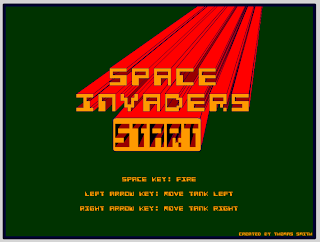
Night Scene
Afternoon Scene
Morning Scene
Saturday, 19 December 2009
Game Design
Well after starting to create the game I actually thought the game looked a bit dull, so I decided I should create all the elements of the Game such as the Tank aliens and the bombs.
So here are the finished elements of the game, please note that all of them have different scenes within them selves to create animations but I decided to only put a few up as it would just take for ever to upload all the images of the individual elements.


So here are the finished elements of the game, please note that all of them have different scenes within them selves to create animations but I decided to only put a few up as it would just take for ever to upload all the images of the individual elements.
Tank

Tank - Eploded
Sheild - Full
Sheild - After one hit
Play Again Button
Play Again Button - On Mouse Over
Alien - 1
Alien - 2
Alien - 3
Level Up Button
Level Up Button - On Mouse Hover
Friday, 11 December 2009
Game Continued
Well I had an interesting day in Chris's lessons and thought I would continue a bit more with my Game and decided to put a start screen in the game so the user can press a start button that then takes him to the game.
Here it is:
Thursday, 10 December 2009
Game Continued
Well after some more time spent on the Flash game project I have now managed to get a missile going up the screen and the alien going across the screen. I now just need to figure out how to complete the collisions and then the scoring bit hopefully get this project done earlier than later so get more time to do some other things in Flash.
Wednesday, 9 December 2009
Start of game
Hello all, I thought for a change I will get ahead of the game and start to create the Flash game for Chris's module IDAT-102. I have decided to create a kind of space invaders game as its an all time favorite but I may put a different twist to it to make it a bit more unique. I started to do the design of it and then created all the objects that will be needed for the game and saved them as movie clips so I can do more with the objects, the next steps are getting the things to move with the user interactions and here is a demo of where I am up to so far.
The Game:
The Game:
Friday, 4 December 2009
Flash...Saviour of the Universe :-)
Well OK as you can probably tell this is one of my first posts on Flash and no not Flash Gordon sorry Chris. So what did I do today... I did some Actionscript 3.0 didn't find it to hard just having to remember what goes where and how so back out with some of the older books and the tutorials. We have been asked to create a game for our next assignment so I thought why not go with an old school favourite... yes you guessed Space Invaders but I might put a little twist into it :-) so watch this space.
Sunday, 22 November 2009
Website Evolution
Hello all, I think my website was OK, wish I had more time to do more on it but then again if it was perfect to start with I wouldn't have anything else to build on so this is where the fun starts and the trial and errors. I still want to flow with the web 2.0 styling but maybe add a bit of old school styling into it, well if you keep a watch on my website It will hopefully start becoming more like what I visualised... That's me over and done with for know so keep a watch out for my new ideas.
Subscribe to:
Posts (Atom)
